

macctl
A command-line tool that reads, sets, diffs, applies and undoes macOS settings. It is built for AI
agents, and people can use it too. Every setting comes from a typed catalog, so an agent never has to
guess a defaults key. Before a setting changes, macctl records its prior state; macctl undo restores
what that setting's recovery contract allows (see Safety).
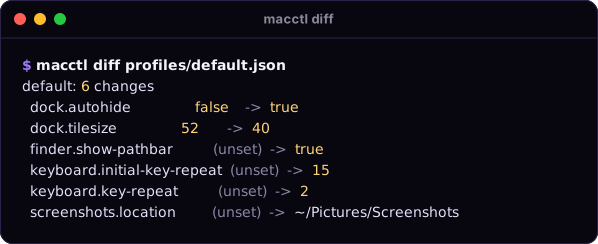
Historical terminal output on this page was recorded on macOS 26.6.2 by tools/record-demos.sh
(read-only commands; the home folder is shown as ~). It is not a fresh verification of this checkout.
Why
- A typed catalog. Each setting has an id, a type (
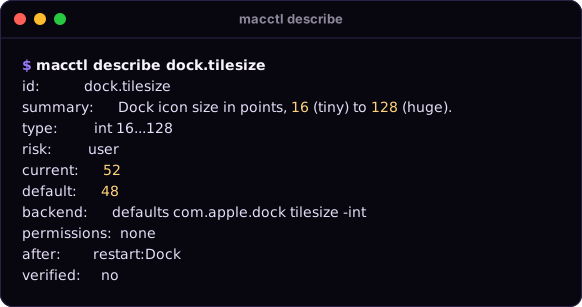
bool,int 16...128,left|bottom|right), a risk tier, the permissions it needs and its side effects.describeshows all of it before youset. - Snapshots and undo. Writes record the prior state first.
macctl undorestores changes, including preference keys that were unset before, subject to hand-edit and backend limits. - JSON for agents.
--json, or a pipe, gives one JSON envelope for command results and execution errors. Argument-parser errors, help/version output and test-mode setup diagnostics are separate.
Requires macOS 15 or later and Swift 6 to build. The current source reports macctl 0.2.4, matching
the workspace VERSION. This base version alone does not identify a build, channel,
source revision or published release; Summon's packaged build identity is a separate contract.
Browse the documentation home, feature reference, settings catalog and security/recovery model.
Install
From macctl/ in this checkout:
swift build -c release --scratch-path ~/Library/Caches/macplugins/macctl/build --product macctl
# Install both macctl and Summon into your user account from the checkout:
bash ../install.sh --from-source
Building alone does not put macctl on PATH. The workspace installer installs it into ~/.local/bin;
see the installation guide for distribution and trust details.
Quick tour
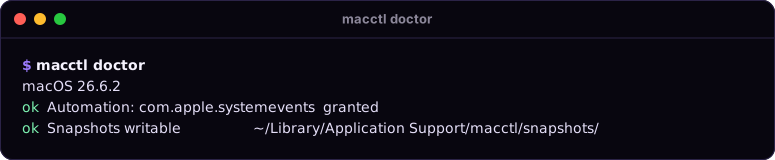
1. Check permissions. doctor shows the macOS version, which permissions are granted, and a System
Settings link for each missing one.
2. Look before you write. diff (above) shows what a profile would change. --dry-run does the
same for set and apply. Neither writes anything.
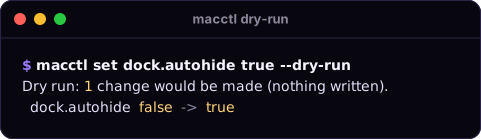
3. Change, then undo. A set or apply that changes values prints its saved snapshot id;
a no-op creates no snapshot. undo restores the recorded prior state within the limits below.
macctl set dock.autohide true    # Applied 1 change. Snapshot <id>. Revert with: macctl undo <id>
macctl undo                      # restores the newest change that was not undone yet
Commands
| Command | What it does |
|---|---|
macctl doctor |
macOS version, which permissions are granted, and a System Settings link for each missing one |
macctl list [--domain <d>] |
every setting with its type, risk and current value |
macctl describe <id> |
full schema of one setting (read this before set) |
macctl get <id>... |
current value of one or more settings |
macctl set <id> <value> [--dry-run] [--yes] |
change one setting |
macctl diff <profile.json> |
what apply would change; writes nothing |
macctl apply <profile.json> [--dry-run] [--yes] [--only <domain>] |
make the Mac match a profile |
macctl snapshot list |
snapshots, newest first (macctl snapshot alone does the same) |
macctl snapshot show <id> |
the old values one snapshot holds |
macctl undo [<id>] [--force] [--dry-run] |
roll back a change (the newest when no id is given); --force also overwrites keys changed by hand (needs an id); --dry-run shows what undo would do to each change |
macctl recover [--force] [--abandon <id>] |
roll back unfinished journaled operations, including an interrupted rollback; safe to run again; legacy failed snapshots need explicit undo |
macctl discover start [--domain <d>]... / discover diff |
save a baseline, change a System Settings control, then inspect changed keys; does not write preferences, but start saves a private baseline file |
Every command takes --json. Run macctl <command> --help for details. The full catalog is in
docs/settings.md.
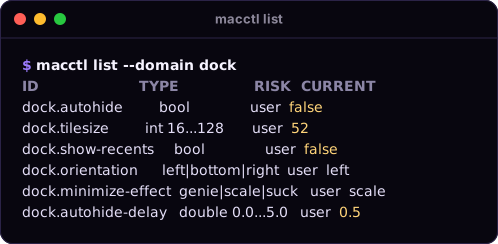
Examples
macctl doctor
macctl list --domain dock
macctl describe dock.tilesize
macctl get dock.autohide dock.tilesize
macctl set dock.autohide true --dry-run
macctl set dock.autohide true
macctl set desktop.wallpaper ~/Pictures/wall.jpg   # every screen; undo restores the old picture
macctl diff profiles/default.json
macctl apply profiles/default.json --only finder
macctl snapshot list
macctl snapshot show 20261016-142501
macctl undo
A value that starts with - needs -- before it: macctl set appearance.accent-color -- -1.
There is no public reset command; undo can remove a preference key that was absent before the change.
Profiles
A profile is a JSON file of desired values. apply is idempotent: it changes only the settings that
differ, and does nothing when the Mac already matches.
{
  "name": "my-mac",
  "version": 1,
  "settings": {
    "dock.autohide": true,
    "dock.tilesize": 40,
    "finder.show-extensions": true,
    "screenshots.location": "~/Pictures/Screenshots"
  }
}
--only dock applies just the settings whose id starts with dock..
Reference
JSON output
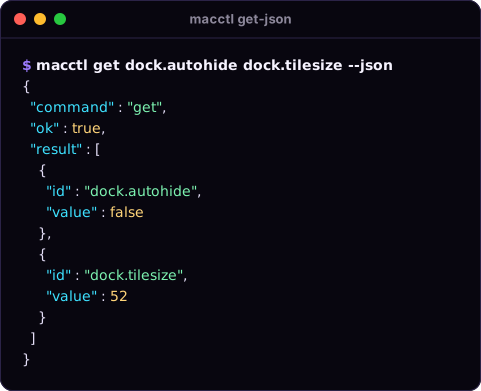
Command results and execution errors use JSON when you pass --json, or when stdout is not a
terminal (a pipe, or an agent's shell). Each such result is one object, with sorted keys and ISO 8601
dates. --help, --version, parser failures and test-mode setup errors do not use this envelope.
Success:
Failure (the exit code matches the error):
{
  "command" : "set",
  "error" : {
    "code" : "unknown_setting",
    "message" : "Unknown setting missing.setting. Run `macctl list`."
  },
  "ok" : false
}
result by command:
list: an array of settings.describe: one setting. Each setting hasid,domain,summary,type({"kind": "int", "min": 16, "max": 128}, or{"kind": "enum", "values": [...]}),risk,permissions(such as"automation:com.apple.systemevents"),sideEffects(such as"restart:Dock","logout","relaunch-apps"or"refresh-appearance"),backend,verified,verifiedOn,systemDefault,current, andcurrentErrorwhen the value could not be read.get: an array of{"id", "value"};desktop.wallpaperreads the main screen's picture path.valueisnullwhen the key is unset and has no known default.diff:{"profile", "changes": [{"id", "from", "to"}]}. A missingfrommeans the key is unset.set,apply,undo:{"snapshotID", "changes", "dryRun", "notes"}; optional fields such assnapshotIDare omitted when absent (for example a no-op or dry run).undo --dry-run:{"snapshotID", "force", "items": [{"id", "action", "current", "restoresTo", "reason"}], "wouldSucceed", "notes"};actionisrestore,delete,already_restored,hand_editedorcannot_restore, newest change first.describe/listsettings also carryminimumOS(null = every supported macOS) andrecovery:{"restore": "exact"|"value"|"conditional"|"compare_only", "priorStates", "verifiedByReadBack", "handEdits", "notUndone", "notes"}.discover start:{"baseline", "domains", "keys"}.discover diff:{"baselineCreatedAt", "macOSVersion", "domains", "changes": [{"appID", "host", "key", "kind", "before", "after", "suggestion"}]}.recover:{"sessions": [{"id", "reverted", "notApplied", "flagged"}], "notes"};sessionsis empty when nothing was unfinished.snapshot list: an array of{"id", "createdAt", "changeCount", "settings"}with optionalstatus,undoes,appliedSettingsandfailure. Journal-derivedstatusiscompleted,rolled_back,undone,recoveredorpending(unfinished: runmacctl recover);failedis legacy only. A missing legacy status means completed. A journaled header on disk always sayspending; use this command's derived status, not the header alone.snapshot show: the snapshot object withid,createdAt,changesand optionalstatus,undoes,appliedSettings,failure. Changes may include typedprior/newand per-display wallpaper metadata.doctor:{"macOSVersion", "checks": [{"name", "ok", "detail", "fixURL"}]}.
Error codes: unknown_setting, invalid_value, command_failed, permission_missing,
needs_confirmation, unsupported, snapshot_not_found, no_snapshots, invalid_profile,
internal_error, mutation_failed, snapshot_exists, transaction_busy, and:
managed_setting: the key is forced by a configuration profile (MDM); nothing was written.recovery_pending: an earlier operation did not finish (recoverySnapshotnames it). Everyset,applyandundorefuses untilmacctl recover.journal_corrupt: a journal line before the last is unreadable; that session is not recovered automatically. Recovery can still restore unrelated sessions before reporting this error; older sessions touching settings blocked by a newer corrupt session are skipped. Inspect the file beforemacctl recover --abandon <id>: this keeps<id>.jsonl.corruptand removes the blocker, but does not restore its settings. A torn last line is ignored and removed before appending, rather than treated as middle-of-file corruption.partial_restore: undo or recover left the keys inflaggedalone because of hand edits, an unavailable prior value or a restore/read-back failure.macctl undo <id> --forcecan overwrite eligible hand edits; it cannot recreate missing wallpaper files/displays or bypass backend restoration limits.invalid_test_mode: aMACCTL_TEST_MODEvariable is set withoutMACCTL_TEST_MODE=1, or test mode is incomplete or names a domain outsidecom.summonos.test.(exit 64).
mutation_failed means a write or its read-back failed and immediate rollback was attempted.
After a completed rollback, appliedSettings lists keys left flagged, normally none. If rollback itself
throws, the session remains pending and appliedSettings conservatively lists attempted settings, not
verified leftovers; inspect recoverySnapshot and run macctl recover. undo --force cannot overwrite
the failed change's third value in a rolled_back session (undo walks applied changes only).
A legacy failed snapshot from an older macctl is not rolled back by recover and does not block
writes; doctor lists it and macctl undo <id> reverts it. Every attempted restore is read back;
a mismatch is revert_flagged (partial_restore), never reported as restored.
Exit codes
| Code | Meaning |
|---|---|
| 0 | ok |
| 1 | error (unknown setting, invalid value, bad profile, a system command failed) |
| 2 | needs a permission; run macctl doctor for the System Settings link |
| 3 | needs confirmation; rerun with --yes |
| 4 | not supported on this macOS version |
Command-line usage errors (a missing argument) exit with 64 and print usage to stderr.
Safety
- Journal and recovery (ADR).
set/applyand undo of a pre-journal snapshot create a session: a write-oncesnapshots/<id>.jsonheader and an append-onlyjournal/<id>.jsonl(0600, directory 0700). Each setting's intent and prior state are made durable before writing, and the result is read back. A failed write/read-back attempts immediate rollback; interrupted or failed rollback stays pending. Further mutations refuse withrecovery_pendinguntilmacctl recoverresolves unfinished sessions. Undo of a journaled session appends revert lines to that same journal: there is no redo. Hand edits are flagged and left alone (partial_restore) unless forced.--forceis an explicit user decision only: Summon never passes it, and an agent must not add it without confirmation that the flagged keys may be overwritten. - Per-setting limits.
describe <id>exposesrecovery: preference keys restore exact presence, CF type and value; dark mode restores its AppleScript value; wallpaper restoration requires the old files and connected displays. Undo does not delete a created screenshot folder, reverse a process restart, log you out or relaunch apps. A preview is not a lock against later external changes. - Safe ids. Every session id (
undo <id>,recover --abandon <id>) must be letters, digits,-or_; anything else (for example../x) issnapshot_not_foundbefore a path is built. - CFPreferences, not
defaults..defaultssettings read and write through CFPreferences on the exact(domain, current user, host)triple, keeping CF types; managed keys are refused (managed_setting). - Display-aware wallpapers. New snapshots retain display UUIDs and paths; reconnect missing displays before restoration. Older scalar snapshots remain readable. A deleted wallpaper file cannot be recreated.
-
Use the upgraded executable for recovery: older binaries ignore the journal. External preference changes are outside macctl's process lock. See the security model.
-
Snapshot selection and retention. State lives under
~/Library/Application Support/macctl/(snapshots/andjournal/).macctl undoselects the newest completed change still in effect; use an explicit id for a legacyfailedsnapshot or a flagged retry. For CFPreferences, absent or inherited priors delete only the written triple's explicit key; explicit priors restore exact type and value even when equal to the default. Finished unflagged journal sessions are eligible for pruning only when older than 30 days and outside the newest 100; pending/flagged and legacy snapshots are retained. This is local recovery history, not an indefinite backup. - Test mode.
MACCTL_TEST_MODE=1withMACCTL_SNAPSHOT_DIR,MACCTL_TEST_CATALOG(domains must start withcom.summonos.test.), optionalMACCTL_FAKE_DEFAULTSandMACCTL_FAILPOINT=<point>[@n]|list|traceis the crash-test seam; restarts never run in it. WithoutMACCTL_TEST_MODE=1these variables are refused.MACCTL_TEST_NOW=<unix seconds>fixes the clock (stable session ids). The fake store also reads the knobs.fail-writes.plist,.drop-writes.plistand.read-back.plistin its directory (each consumed by the first write). - Crash matrix.
Tests/MacCtlCrashTestsdrives a built debug executable with kill-at-failpoint cases and compares recovered test-domain state. Ordinary tests select a fake-store smoke slice;MACCTL_CRASH_BACKEND=fakeorcfprefsselects the full matrix, optionally sharded withMACCTL_CRASH_SHARD=1/3(run all shards for coverage).MACCTL_BINmust point to the matching debug binary when using an external scratch path.cfprefsuses disposablecom.summonos.test.<run-id>.<uuid>domains. See Development checks; this describes the harness, not a claim that it passed for this checkout. - Dry runs.
--dry-runanddiffshow the plan and write nothing. - Risk tiers. The current 39-setting catalog marks every setting
user. The engine also supportsread,adminanddestructive; a changingadmin/destructivesetting requires--yes(exit 3 without it).--yesis not privilege escalation and does not bypass permissions or MDM. - Permissions. macctl checks permissions without triggering a prompt. A missing one stops the command with exit code 2 and a link to the right System Settings pane. macOS gives the grant to the app that runs macctl (Terminal, iTerm, or your agent's host app).
- No shell strings. Preference values use CFPreferences; AppleScript values arrive only as argv to fixed script text, never spliced into a shell or AppleScript source.
- Side effects. Changed settings batch each active effect once: Dock/Finder/SystemUIServer
restarts and appearance refresh. Logout and app relaunch requirements are advisory
notes. Accent changes post both private CoreUI color-change notifications on apply, undo and recovery; apps may still need reopening. Finder's separate Folder color follows the accent only in Automatic; explicit/custom folder colors are not changed. See the appearance caveat.
Development checks
The following are commands for a developer to run, not results from this documentation audit.
From macctl/, with full Xcode selected (Swift Testing available):
CACHE="$HOME/Library/Caches/macplugins/macctl/build"
swift build --build-tests --scratch-path "$CACHE"
BIN_DIR="$(swift build --show-bin-path --scratch-path "$CACHE")"
MACCTL_BIN="$BIN_DIR/macctl" swift test --skip-build --scratch-path "$CACHE"
# Full matrix on the fake store; repeat with cfprefs on macOS for the native backend:
MACCTL_BIN="$BIN_DIR/macctl" MACCTL_CRASH_BACKEND=fake \
  swift test --skip-build --scratch-path "$CACHE" --filter MacCtlCrashTests
With Command Line Tools only, Swift Testing may require the framework search/rpath flags used by the workspace's Summon test helper. That helper tests Summon, not macctl; do not use it as a replacement for the commands above. Keep scratch output outside the checkout.
Demos
The terminal cards are rendered from the transcripts in docs/demo/ by
tools/readme-art.py (from the repo root). To record real ones on a Mac, with macctl installed:
brew install vhs          # optional, for docs/demo/demo.gif
tools/record-demos.sh     # runs only read-only commands, scrubs $HOME and tools/private-patterns.txt
License
MIT